Agentic Case Processing in Salesforce with Veryfront

Table of Contents
Overview
Agentic Case Processing is a Veryfront template that triages new Salesforce cases
with an agentic workforce, on a schedule. For each new case it assigns a category and type from your
service taxonomy, names the team that should own it, sets the case Reason and
Type fields, and records the verdict as a private case comment with a
confidence score.
Primitives
The template is built from Veryfront capabilities you can reuse in any project:
- Agents — one orchestrator, three isolated sub-agents.
- Skills — each agent's process in a reusable file.
- Knowledge — the taxonomy, retrieved at run time.
- Tools — run on the Veryfront control plane, enabled per agent.
- Integrations — Salesforce over OAuth.
- Schedules — runs automatically in the background.
- Evals — each agent validated against mocked tool calls before it ships.
Architecture
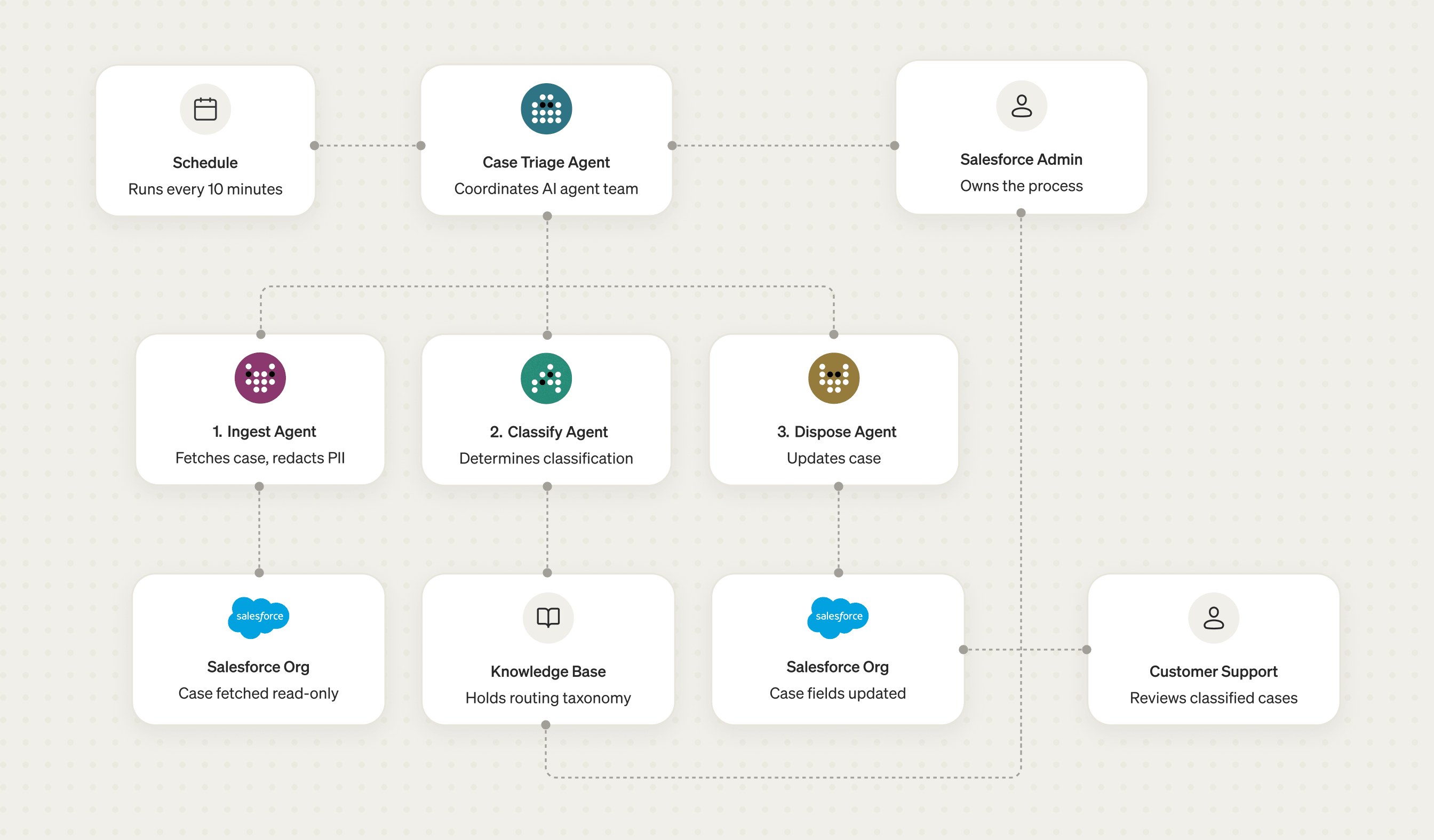
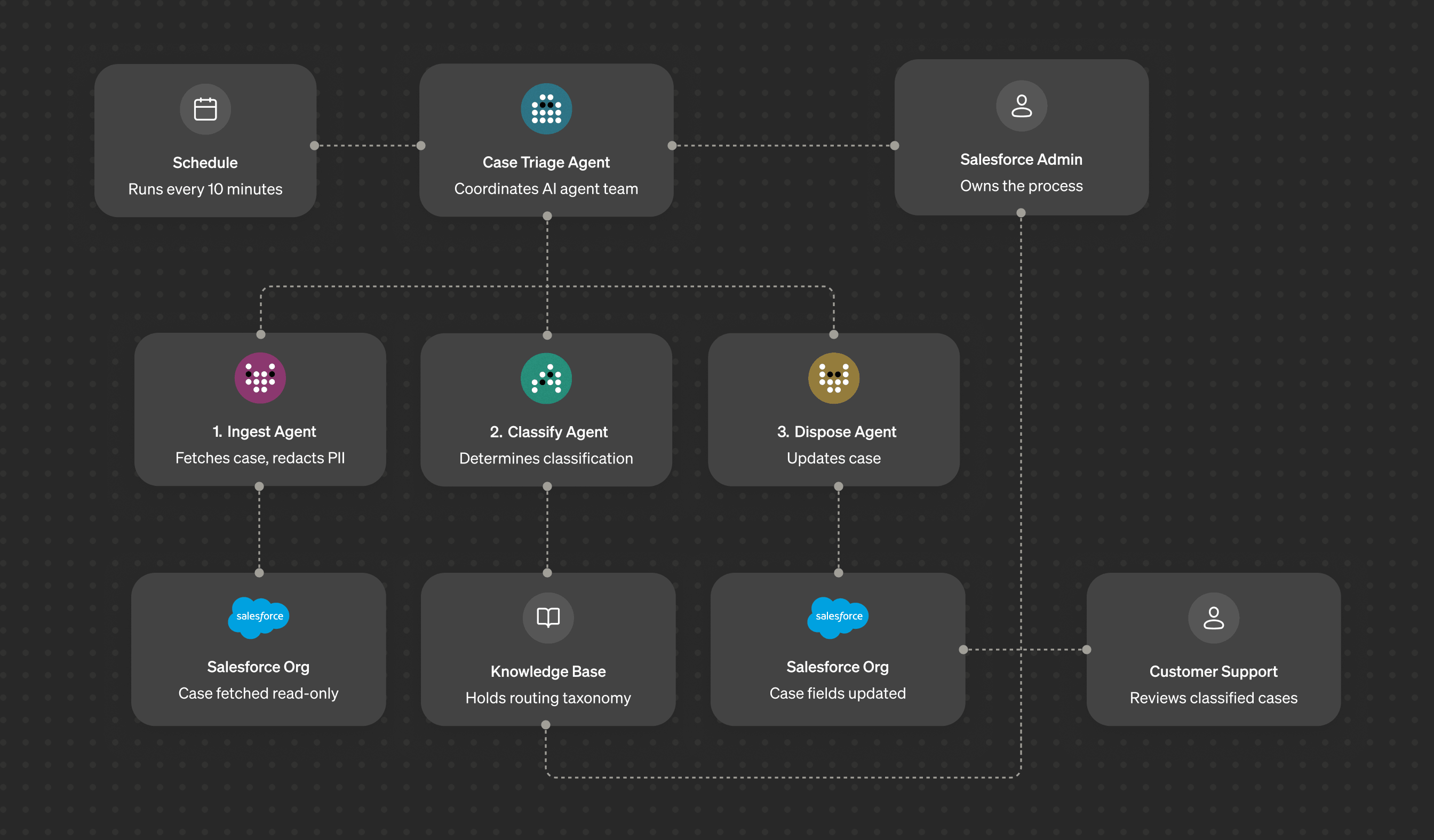
The template ships an agent team of four: an orchestrator plus three specialists, each handling one step with the minimum access it needs. Every agent's process lives in a Skill it loads at runtime, so the agent files stay small.
Case Triage Agent
This agent is the orchestrator. It delegates each step with
invoke_agent, which runs the child in an isolated context and returns only its
result. It has no Salesforce or knowledge access of its own. It only coordinates.
import { agent } from "veryfront/agent"; export default agent({ id: "case-triage", name: "Case Triage", description: "Orchestrates the three-step pipeline: Ingest → Classify → Dispose. " + "Delegates each phase to a specialised sub-agent with minimal permissions.", model: "anthropic/claude-sonnet-4-6", system: "You coordinate a three-step pipeline to triage Salesforce cases, " + "delegating each phase to a specialist sub-agent. You never access " + "Salesforce or the knowledge base directly.", skills: ["triage-run-loop"], tools: { invoke_agent: true },});Case Ingest Agent
This agent fetches the case from Salesforce and redacts all PII (names, emails, phone numbers, addresses) before anything downstream sees it. Read-only.
export default agent({ id: "case-ingest", skills: ["case-normalise-redact"], tools: { salesforce__get_case: true, salesforce__list_cases: true, salesforce__list_case_activity: true, },});Case Classify Agent
This agent reads the taxonomy from the knowledge base and returns a structured verdict: category, type, owning team, and a confidence score. No Salesforce access.
export default agent({ id: "case-classify", skills: ["case-classification"], tools: { search_knowledge: true, get_file: true },});Case Dispose Agent
This agent writes the result back: sets the case Reason and Type and posts
the private triage comment. Comment plus those two fields, nothing more.
export default agent({ id: "case-dispose", skills: ["case-comment-writer"], tools: { salesforce__update_case: true, salesforce__add_case_comment: true, },});Guardrails
- Least privilege. Case Dispose can add a comment and set the
ReasonandTypefields, and nothing else. It cannot reassign, close, or reprioritise a case, because it has no tool for those operations. The restriction is enforced by tool configuration, not by a prompt. - PII containment. Ingest redacts names, emails, phone numbers, and addresses before any case text reaches classification or a written comment. The raw case body never reaches the orchestrator.
- Private comments. Triage comments are written programmatically with
IsPublishedset tofalse, so a confidence score is never exposed to a customer.
Using knowledge for classification
The taxonomy lives in the project's
Knowledge. On every run, Classify
reads the taxonomy from Knowledge and returns only the categories and types the
taxonomy defines. The taxonomy is a compact routing spec: a closed set of categories and
types, each mapped to a Reason/Type picklist value and an owning team.
---title: Case Triage Taxonomydescription: Authoritative taxonomy for classifying and routing Salesforce cases.--- # Case Triage Knowledge - Taxonomy v1 This document is the single source of truth for how incoming cases areclassified and routed. The triage agent reads it on every run.Clear category boundaries and routing rules keep classification accurate as case volume grows. The taxonomy is a versioned file separate from the agents, so support owns the categories and every classification traces back to the revision that produced it. Updating a team or a routing rule is a Markdown edit.
Output
Each run sets the case Reason and Type, then posts one private comment in a
format that a person can read and a system can parse:
[Triage] Performance → Degraded outputCustomer reports the generator is producing below its rated output under load.Suggested team: Field Engineering ---category: Performancesubcategory: Degraded outputreason: Performancetype: Mechanicalconfidence: 0.88team: Field Engineeringtaxonomy: v1agent: case-triage/2026-08-12T09:15ZThe metadata block adds the audit detail (confidence, taxonomy version, agent
timestamp) that a field can't hold. The Reason and Type fields make every case filterable in Salesforce reports. Below a confidence threshold, the comment flags the case for
human review rather than guessing.
Note:
teamis a routing suggestion in the comment, not a written field. In Salesforce the owning team is the case Owner, typically a Queue, and this template leaves ownership untouched to stay zero-config. To route automatically, store a map of Queue IDs and names in Knowledge and use theteamvalue to set the case Owner to the matching Queue.
Automation
A schedule runs the case-triage agent every 10 minutes to triage new open cases:
import { schedule } from "veryfront/schedule"; export default schedule({ id: "triage-new-cases", name: "Triage new cases", schedule: "*/10 * * * *", timezone: "Europe/Berlin", target: { kind: "agent", id: "case-triage" },});The same schedule can be created from the Studio UI. See Schedules.
Evals
Every agent ships with an eval that runs it against mocked tool calls and checks
its behaviour: Ingest redacts PII, Classify reads the taxonomy and returns
the right verdict, Dispose sets both fields and posts the comment, and the
orchestrator runs the full pipeline end to end. Run npm run eval locally, and wire it into CI/CD so every change is gated on
the pipeline still passing before it ships. See Evals.
Business impact
New cases no longer wait on a person for the first pass. Within minutes of a case arriving it's classified, routed to the owning team, and annotated with the reasoning and a confidence score, around the clock, not just in working hours.
The support team gets faster, more consistent routing and far less manual triage. Every classification is auditable on the record, and people spend their time on the low-confidence cases the agent flags rather than sorting the queue. Customers feel it as a quicker, more reliable response.
Advanced
Trigger the pipeline from a Webhook instead of a Schedule, starting a triage run the moment a case is created in Salesforce, rather than waiting for the next scheduled sweep.
Deployment
Deploy to Veryfront Cloud with one command using Veryfront Code, or one click in Veryfront Studio. The whole project template lives in code, so you can also self-host it in your own environment with CI/CD.
Get started
- Fork the project on GitHub — follow the README to get started.
- Use the template in Studio — create a new project.
Then authenticate with Salesforce in Studio. As the project template uses the
standard Salesforce Case Reason and Type picklists, there are no custom fields
to create and nothing to configure.
Pro coders
Fork the repo on GitHub and run it locally with the open source Veryfront Code framework.
Citizen developers
Start in Veryfront Studio: fork the template in the browser, connect Salesforce, and turn on the schedule. No local setup.